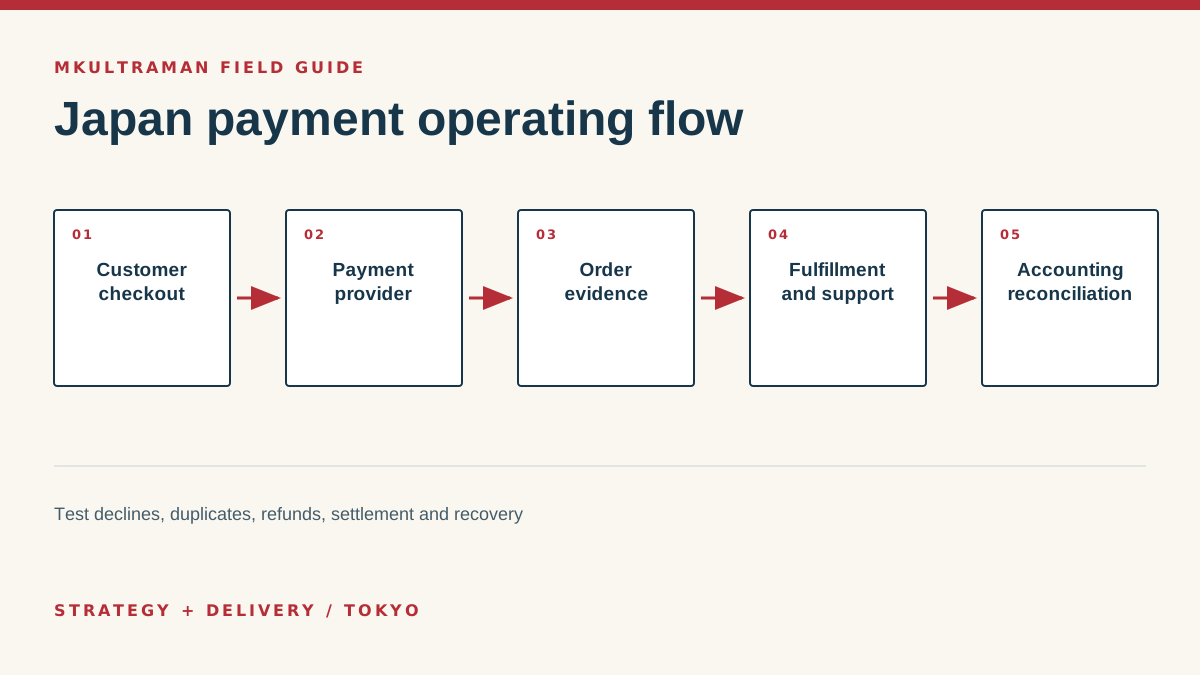
Start with the sale, not the payment provider
“How do we accept payments in Japan?” sounds like a product question, but the useful answer begins with the sale. A consultant collecting a deposit, an events company selling timed tickets, and a retailer shipping physical goods have different confirmation, refund, fulfillment and support needs. The right setup connects the buyer’s decision to a reliable internal record. The logo on the checkout page is only one component.
Write down the complete path before opening provider accounts. What does the customer buy? Is the amount fixed, quoted or recurring? When is delivery considered complete? Who may refund it? Which receipt or invoice does the buyer expect? Which system tells the delivery team to act? How will accounting match a provider payout to individual sales and fees? A checkout that answers only “was the card charged?” leaves the difficult work to spreadsheets and inbox searches.
Define the commercial states
A useful order model distinguishes at least requested, awaiting payment, paid, fulfilled, refunded and cancelled. Subscriptions may add trial, active, past due and ended. Those words need operational definitions. “Paid” should mean the provider has confirmed the charge through a trustworthy server-side event, not merely that a browser displayed a success page. “Fulfilled” should mean the promised access, shipment or service was delivered and recorded.
Keep price authority clear. For a simple service, a hosted payment link may define the amount. For a catalogue, the commerce system may own products and taxes while the payment provider handles authorization. For invoices, an accounting or invoicing system may be authoritative. Avoid maintaining the same price independently in a website button, a sales document and a payment dashboard without a controlled update process.
Choose payment methods from buyer evidence
Cards are an obvious online starting point, but they are not the whole Japanese market. Depending on the audience and purchase, buyers may expect bank transfer, wallet payments, convenience-store payment, cash on delivery or an invoice. A business-to-business customer may care more about a correct invoice and payment term than instant checkout. A visitor buying an event ticket from a phone may value a short wallet flow. An overseas buyer may need an internationally accepted card and English support.
Do not add every method because a provider lists it. Each one creates states, fees, settlement timing, support questions and refund behavior that staff must understand. Begin with known buyer demand. Review abandoned checkouts, sales inquiries and failed-payment support. Add a method when the likely recovered revenue or customer access outweighs its operating burden.
| Method | Often useful for | Operational questions |
|---|---|---|
| Cards | Immediate online purchase, subscriptions, international buyers | Declines, disputes, recurring consent, expired cards |
| Bank transfer | Quoted services and business customers | Matching payer to invoice, deadlines, overpayments |
| Wallets | Mobile-first consumer checkout | Device support, provider coverage, refund path |
| Convenience-store payment | Customers who prefer cash-based local access | Delayed confirmation, expiry, fulfillment timing |
| Invoices | Approved business accounts and larger engagements | Credit approval, collection, tax records, aging |
Design for language and trust
A Japanese checkout needs more than translated button text. Confirm name and address fields, character handling, telephone formatting, tax and delivery language, customer support hours and the legal disclosures appropriate to the sale. Show the business identity, total price, timing, cancellation or refund terms, and what happens after payment. If English and Japanese pages describe the same offer differently, support staff inherit the contradiction.
Keep the path visually and technically consistent with the site. An abrupt domain change can worry buyers, but pretending a hosted provider page is fully custom can be worse. State what will happen, use the provider’s supported branding controls, and return the buyer to a confirmation page that displays a real order reference rather than a vague thank-you.
Compare provider models, not just headline fees
A payment gateway, merchant acquiring relationship, payment service provider, commerce platform and invoicing tool can overlap, but they are not identical. Hosted providers such as Stripe or PayPal can give a small team a fast route to online checkout. A commerce platform may join catalogue, inventory, tax, shipping and payments. A specialized domestic arrangement may support local methods or commercial terms that a global service does not.
Compare eligibility first. Which legal entity signs the agreement? Where is it established? Which bank receives settlement? Which products, currencies and sales models are supported? What underwriting or identity documents are required? Then compare operating fit: payout schedule, refund controls, dispute evidence, exports, webhooks, recurring billing, user roles, audit logs, support and termination.
Headline transaction pricing is only one cost. Include monthly fees, international-card or currency costs, dispute fees, refund treatment, paid add-ons, developer time, bookkeeping time and the cost of changing later. A slightly higher fee can be rational when the provider removes reconciliation work and gives staff a safer administration model. A low fee is expensive when every payout takes an hour to explain.
Design the operating flow around evidence
Use server-side confirmation or the provider’s supported webhook mechanism for consequential status changes. Browser redirects can fail, be repeated or be manipulated. Record the provider transaction ID, internal order ID, amount, currency, customer reference and event time. Make event handling idempotent so a retry does not create a second fulfillment or duplicate record.
Define who receives failure alerts and what they do. Webhooks can be delayed. An integration can lose permission. A product can be renamed without updating checkout. The recovery path should let an authorized person compare the internal order with the provider record and safely replay or correct the handoff. Log enough context to investigate without placing full payment credentials or unnecessary personal data in ordinary application logs.
Join customer service and accounting
Give support staff a searchable order reference and a clear permission boundary. They should be able to explain status without sharing an administrator account. Refund authority can require a second approval above a threshold. Bank-detail changes and API-key creation deserve strong authentication and notification because they can redirect money or expose the system.
For accounting, map gross sales, taxes, provider fees, refunds, disputes and net payouts. Provider deposits often combine many transactions, so reconciliation needs stable IDs. Decide whether the accounting system receives individual sales, payout summaries or both. Preserve the original export and any transformation used to import it. That makes a monthly close reproducible rather than dependent on one person’s spreadsheet.
Test failure and recovery before launch
A successful test card is the beginning of validation. Test a decline, an abandoned payment, two rapid clicks, a duplicate webhook, a refund, a partial refund if supported, a changed amount, an expired link and a lost confirmation email. Confirm the customer, support person, fulfillment system and accountant each see a coherent result.
Run the launch in stages. Start with internal buyers or a limited offer, watch provider and application logs, and reconcile the first payouts manually. Keep the previous collection path available when practical until the new flow has settled. Announce an owner and a support procedure so questions are not scattered among the developer, accountant and salesperson.
Review after real use
After 30 days, review conversion, payment-method demand, declines, refunds, disputes, support time and reconciliation exceptions. Remove unused options and fix ambiguous messages. Revisit access quarterly and after staff or vendor changes. Track renewal terms and preserve exports. A payment system is durable when buyers can pay, staff can explain what happened, the books agree, and the business can recover or change providers without losing the evidence of its sales.
Tips and practical checks
Small moves that prevent expensive cleanup
- Run one real low-value transaction after the test environment passes. Confirm the bank settlement, receipt, order record and refund path.
- Keep the legal business name, support email, refund terms and delivery timing consistent across checkout, receipts and the website.
- Record who can issue refunds, change bank details, create API keys and export transaction data.
- Export a monthly transaction file before accounting asks for it. Check that tax, fees, refunds and payout IDs reconcile cleanly.
- Use hosted checkout when custom code does not create a clear commercial advantage. It reduces the surface your team must secure.
- Write the customer-support reply for a failed or duplicate payment before the first campaign sends traffic to checkout.
Watch
Payment Links vs Invoices
Video by Stripe Developers. Watch on YouTube ↗
FAQ
Frequently asked questions
Do I need a Japanese company to accept payments in Japan?
Provider eligibility varies by product, business location and settlement country. Do not assume that a foreign account can settle locally. Check the provider’s current Japan onboarding requirements and confirm the contracting entity, bank account and tax treatment with qualified advisers.
Should a small business build a custom checkout?
Usually not at the beginning. A hosted checkout or payment link is faster to test and shifts more security work to the provider. Custom checkout makes sense when the buying flow, product configuration or integration creates enough value to justify ongoing engineering and compliance work.
Which payment methods should I launch first?
Start with the methods your actual buyers ask for and your operating team can support. Cards are common for online sales, but bank transfer, wallets, convenience-store payments or invoices may matter by audience. Measure abandoned checkout and support requests before adding more.
What should I test besides a successful charge?
Test declines, duplicate submissions, refunds, partial refunds, tax and receipt fields, delayed confirmation, webhook retries, expired sessions, changed prices and the accounting export. Also confirm what the customer and staff see at every step.
Sources and further reading
Official references
Product features, prices, and Japanese requirements can change. Check the primary source before making a consequential decision.
- Stripe documentation for Japan ↗ Stripe
- PayPal business services in Japan ↗ PayPal
- Act on Specified Commercial Transactions guide ↗ Consumer Affairs Agency, Japan
- Payment Services Act ↗ Japanese Law Translation, Ministry of Justice
- Security standards and resources ↗ PCI Security Standards Council