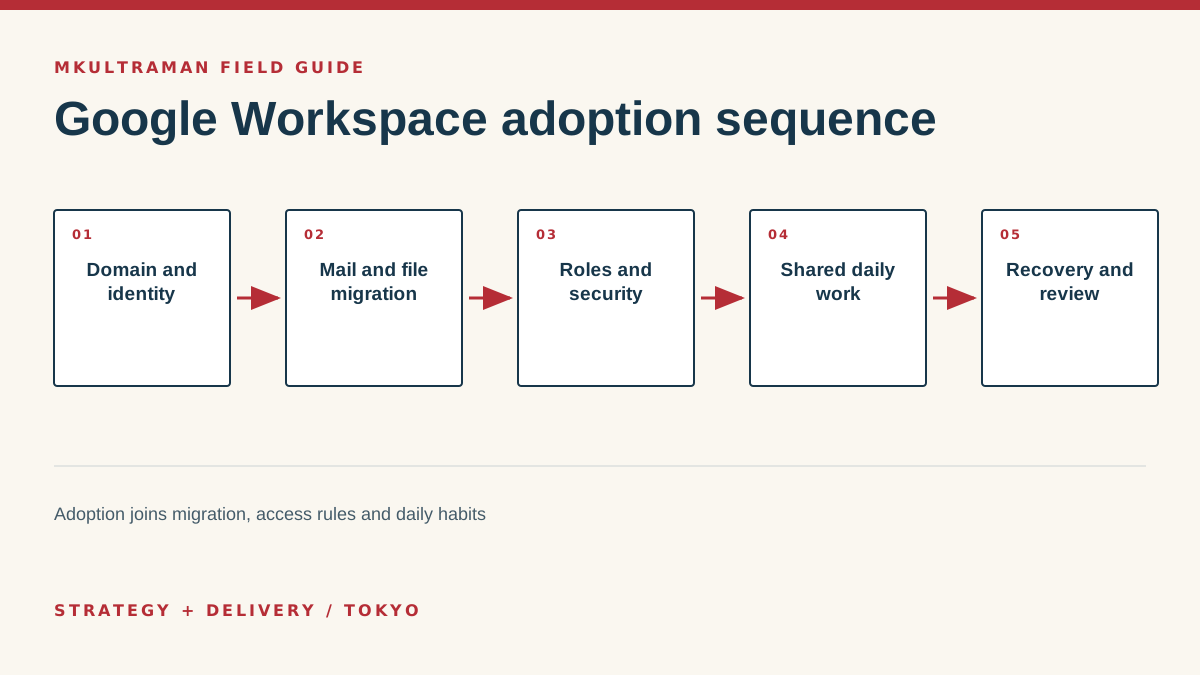
Prepare ownership, scope and the target operating model
A Google Workspace migration changes the organization’s identity layer, communication, files, calendars and daily collaboration. Treating it as an email copy creates predictable cleanup: former staff own important documents, teams invent conflicting shared drives, administrators use personal accounts, and nobody is certain which calendar or file is authoritative.
Begin with ownership. The company should control the domain registrar, DNS, Workspace subscription, billing method and recovery channels. Record at least two protected super-admin identities. Do not use a departing employee, reseller or individual founder’s consumer address as the only recovery path. Verify access to the registrar and DNS before a mail cutover makes the domain urgent.
Define the rollout scope. List users, aliases, groups, shared mailboxes or collaborative inboxes, calendars, rooms, devices, mail archives and file stores. Note contractors and seasonal users separately. Decide which old data will migrate, remain available as an archive or be disposed of under an approved policy. Migration is not improved by copying every duplicate and obsolete file into a newer platform.
Pilot with representative work
Select a small pilot that includes different jobs, devices and language needs. Test executives, administrators, frequent calendar users and people who collaborate externally. Include Japanese and English display names, signatures and groups where relevant. Ask pilot users to complete real tasks rather than simply confirm that Gmail opens.
Set success criteria: messages arrive and send correctly, historical mail is searchable, delegated access works, calendars and rooms behave as expected, shared files retain appropriate ownership, mobile access is controlled, and recovery has been tested. Keep the old system available according to the rollback plan until the pilot evidence is accepted.
Configure identity and the domain carefully
Use one account per person and role-based groups for access. Avoid shared passwords for addresses such as info@. Depending on the workflow, an alias, Google Group, delegated mailbox or customer-service system may be more appropriate. Choose based on assignment, history and accountability needs, not merely the appearance of the address.
Plan organizational units and groups around policy. Organizational units apply settings, while groups can grant access and support communication. Keep the structure understandable. A small SME rarely needs a detailed replica of its organizational chart. It does need clear sets for employees, contractors, administrators and any roles with different sharing or device requirements.
Prepare DNS records and lower time-to-live values only when useful and understood. Google’s setup process provides the required verification and mail records. Configure SPF, DKIM and DMARC deliberately, checking every legitimate sender that uses the domain. Marketing, ticketing and website systems can fail authentication if they are forgotten. DMARC reporting can reveal unauthorized or misconfigured sources before enforcement is tightened.
| Control | Purpose | Evidence to retain |
|---|---|---|
| Domain verification | Proves control of the sending domain | Registrar and DNS ownership record |
| SPF | Identifies permitted sending services | Current sender inventory and DNS value |
| DKIM | Signs mail for domain authentication | Selector, activation status and test result |
| DMARC | States policy and provides reports | Policy decision, reports and review owner |
| Recovery | Restores administrative control | Protected accounts and tested procedure |
Migrate mail, calendars and files in controlled stages
Inventory source volume, file formats, permissions and known corruption before choosing a migration method. Google and specialist partners provide tools for common sources, but the right path depends on the current platform, amount of data, available bandwidth, coexistence needs and required fidelity. Test attachments, labels or folders, calendar recurrence, contact fields and sharing, not just counts.
Use migration IDs and logs that let the team reconcile source and destination. Record exclusions and errors. Re-run a delta migration close to cutover so activity during the migration window is captured. Tell users exactly when to stop creating new items in the old platform, when DNS changes, and how to identify the authoritative destination.
Put organization-owned files in shared drives
My Drive is attached to an individual. Shared drives are designed for team-owned content and can simplify continuity when people change. Create a small number around durable business functions or projects. Define managers, contributors and viewers. Avoid making everyone a manager simply to reduce setup questions.
Do not migrate permissions blindly. Old folders often contain accidental public links, former contractors and inherited access. Review sensitive and externally shared areas first. Preserve necessary external collaboration, but name an internal owner and a review date. Where a file belongs in a specialist system, such as accounting or CRM, do not use Drive as an uncontrolled second master.
Set security, administration and recovery
Require multifactor authentication and plan enrollment before enforcement. Prefer phishing-resistant methods for administrators and high-risk users where available. Store backup methods safely. Do not allow the rushed launch to create shared recovery codes in an ordinary team document.
Use separate super-admin and daily accounts. Grant narrowly scoped roles for user management, groups, services or support. Review third-party applications with domain-wide access. OAuth connections can move or expose data even when no password is shared. Keep an approved-app process proportionate to the company, and remove integrations that have no active owner.
Decide mobile and endpoint expectations. A company-owned managed device can support stronger controls than an employee’s personal phone. If bring-your-own-device access is allowed, state what the organization can manage and what happens when a device is lost or employment ends. Match policy to the information and job rather than applying performative restrictions nobody can follow.
Train, launch and stabilize daily use
Train by workflow. Show staff how to schedule across time zones, find a shared file, move a draft into team ownership, work with an external partner, report phishing, recover an account and hand work to a colleague. A tour of product icons is not adoption. Provide short job aids in the language people use at work.
Run cutover communications through more than the system being changed. Give the date, expected interruption, first login steps, support channel and clear list of what moved. Arrange floor or remote support for the first business day. Track incidents by type so recurring confusion becomes a training or configuration fix rather than a series of private answers.
Close the old environment properly
After acceptance, confirm mail flow, forwarding and domain authentication. Reconcile user and file counts within the limits of the tools. Preserve the approved archive and migration logs. Remove obsolete forwarding, connected applications and administrator access. Cancel licenses only after contractual, retention and recovery requirements have been addressed.
Review after 30 and 90 days. Inspect external sharing, administrator roles, suspended users, group ownership, unused licenses, recovery status and common support themes. Ask teams where they still keep shadow copies. Refine shared drives and training rather than adding another collaboration platform to avoid a solvable Workspace problem.
A strong rollout leaves more than working mail. The company knows who owns the domain and tenant, staff can find organization-owned information, access follows roles, unusual activity can be investigated, and recovery does not depend on one person. That is the difference between installing a suite and adopting an operating platform.
Tips and practical checks
Small moves that prevent expensive cleanup
- Create two protected super-admin accounts and use separate lower-privilege accounts for daily administration.
- Test DNS changes and mail flow with a pilot domain or small user group before the final cutover.
- Use shared drives for organization-owned files. A former employee’s personal My Drive should not be the archive.
- Publish naming rules for groups, shared drives, calendars and external sharing before each team invents its own.
- Train with real tasks such as scheduling, finding a file, handing over a role and reporting a suspicious message.
- Run a restore and account-recovery exercise after launch. Written policy is not evidence that recovery works.
Watch
How to Access DNS Settings in the Admin Console
Video by Google Workspace. Watch on YouTube ↗
FAQ
Frequently asked questions
Can we move email first and files later?
Yes, and staged migration is often easier to control. Document the temporary boundaries so staff know where new files belong, which calendar is authoritative and when the old platform becomes read-only.
Do we need a Google Workspace reseller in Japan?
Not always. Direct purchase may suit a small capable team. A reseller can be useful for Japanese-language support, procurement, migration and continuing administration. Compare service scope, account ownership and exit terms, not only license price.
Should everyone be able to share files externally?
Set rules according to the information and job. Broad prohibition can drive shadow tools, while unrestricted sharing creates exposure. Use groups, shared drives, approval paths and periodic review to make the safe route practical.
Is Google Workspace a backup?
The service provides resilience and recovery features, but retention, deletion and business recovery requirements differ. Decide what must be recoverable, for how long, and whether an independent backup is warranted.
Sources and further reading
Official references
Product features, prices, and Japanese requirements can change. Check the primary source before making a consequential decision.
- Google Workspace setup FAQ ↗ Google Workspace Admin Help
- Security checklist for small businesses ↗ Google Workspace Admin Help
- Administrator privilege definitions ↗ Google Workspace Admin Help
- Shared drives overview ↗ Google Workspace Learning Center
- Email sender guidelines ↗ Google Workspace Admin Help