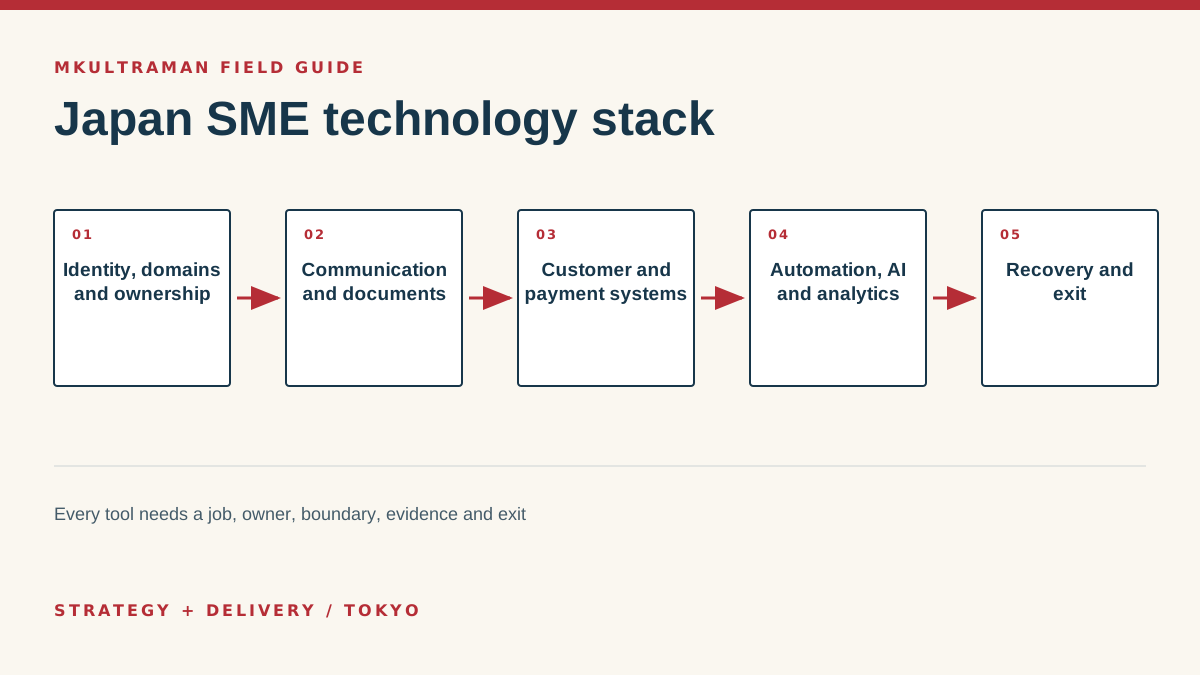
Map business capabilities before choosing tools
A technology stack should describe how the organization operates, not merely which subscriptions it pays for. Start with capabilities: identity, communication, documents, website, customer relationships, sales, payments, accounting, analytics, projects, publishing, security and recovery. A small company may cover several capabilities with one suite. Another may need specialist systems because its customer journey or regulated work is more complex.
For each capability, document the job, users, authoritative records, current tool, owner, integrations, cost, main risk and exit. Mark manual work that is deliberate and manual work caused by a missing handoff. Do not automate a step simply because a person touches it. Human review may be the control. Focus on re-entry, waiting, inconsistency and tasks that fail silently.
Use the map to find duplication. Two chat platforms may be necessary because customers arrive through different networks, but the team can still steer continuing work to preferred email and Signal paths. Two customer databases are harder to justify if neither is authoritative. The useful question is not “Can we consolidate?” but “Which boundary gives customers and staff a clear path while preserving control?”
Sequence by dependency
Identity, domains and recovery sit below most other systems. Fix those first. Customer systems depend on trustworthy identity and email. Automation depends on stable records and permissions. Analytics depends on defined events and consent. AI depends on data boundaries and a process whose result can be reviewed. Buying in the opposite order produces attractive pilots on an unstable base.
Create a 12-month roadmap with no more than a few active priorities. Include the operational time needed for migration, training and stabilization. A small team cannot absorb constant platform change while serving customers. Rhythm matters: avoid major cutovers during peak sales, payroll, events or statutory work where possible.
Build company-owned identity, domains and recovery
The company should control its registrar account, DNS, primary email and identity tenant, hosting billing and critical recovery channels. Use organization-owned addresses, protected administrator identities and multifactor authentication. Record a break-glass recovery method. Remove former staff and vendors promptly, but preserve required records through controlled ownership transfer rather than shared passwords.
Choose communication boundaries. Email is an efficient, portable business record for considered communication. Signal offers strong private messaging for direct coordination. WhatsApp, Facebook Messenger, LINE, Matrix, Slack and Discord can be necessary bridge channels because other people already use them. Use those channels to begin communication when needed, then move sustained client work toward agreed email and Signal paths where practical. Preserve consequential decisions in the appropriate business system.
Design organization-owned document storage. Personal drives and inboxes should not be the only location for contracts, final deliverables or operating instructions. Create a small structure with named owners, access groups, archive rules and external-sharing review. Avoid replicating the entire organization chart as folders. People need to predict where information belongs.
| Foundation | Control | Recovery question |
|---|---|---|
| Domain | Company-owned registrar and DNS access | Can two authorized people renew and change it? |
| Identity | Named users, MFA, narrow admin roles | Can an admin recover access without a vendor? |
| Authenticated domain and managed groups | Can mail flow and records be restored? | |
| Documents | Organization-owned storage and permissions | Do files survive role and vendor changes? |
| Billing | Recorded owner, renewal and payment method | Will service continue if one person is absent? |
Pick one tool for each everyday job
A small business in Japan needs one tool for each core job, owned by the company and used by the whole team: a workspace for email, files and accounts, one internal chat tool, a place to track work, a customer record, Japanese accounting software that handles the invoice system, and a way to take payments. For most 5 to 50 person companies that is six to eight products, not thirty. The brand names matter less than having an owner for each layer, one system of record for each kind of information, and tools that pass data to each other instead of relying on retyping. For the arrangement many companies actually run, built on LINE, Excel and fax, read the real Japanese SME stack.
Google Workspace or Microsoft 365
This is the foundation, because it holds company email addresses, files and usually the login for everything else. Google Workspace suits companies that work mostly in the browser, collaborate on shared documents and want simple administration. Microsoft 365 suits companies whose customers, accountants or partners exchange Excel and Word files heavily, or which already run Windows PCs and need desktop Office. Both work well in Japanese. I compare them in Google Workspace vs Microsoft 365 for Japan, and there is a separate guide to Google Workspace adoption for Japan SMEs.
One internal chat tool
Choose one internal chat tool and make it the official channel for work. Chatwork is widely used by Japanese small businesses and many of their clients, and it is simple for staff who are not heavy software users. Slack fits teams with international staff or developers and has the deepest set of integrations. LINE WORKS feels familiar to staff who already use LINE and can connect to customers' LINE accounts, which helps field teams and shops. Microsoft Teams makes sense if you already pay for Microsoft 365. Customer-facing LINE is a separate decision: a LINE Official Account keeps customer conversations under a company account rather than on staff members' personal phones. See Chatwork vs Slack in Japan for the internal choice.
A place to track work
Task tools are where companies most often end up paying for two or three overlapping products. Backlog from Nulab is the default for many Japanese teams running projects, especially IT and agency work, and it is familiar to local developers and vendors. Notion suits small teams that need documentation and task lists in the same place. kintone from Cybozu suits companies that want custom business apps, such as request forms, inspection records or order tracking, without writing code. I compare the first two, plus Linear, in Notion vs Backlog vs Linear for Japan teams.
A customer record
You need one reliable customer record. For some businesses that is a well-kept spreadsheet. A CRM earns its place when deals slip through gaps, when a salesperson leaving would take the customer history with them, or when follow-ups need to happen automatically. HubSpot's free CRM is a practical starting point, kintone works well for Japanese teams that want a record shaped to their process, and Salesforce is rarely the right first CRM for a small company. Before choosing, read why CRM rollouts fail at Japanese SMEs and the CRM guide for Japan SMEs.
Japanese accounting software
Accounting is the layer where international tools struggle most. The software has to handle Japanese tax rules, the qualified invoice system (インボイス制度) introduced in October 2023, and electronic storage of transaction records under the electronic bookkeeping law (電子帳簿保存法). freee and Money Forward Cloud are the two main cloud options for small businesses, and both connect to Japanese banks and credit cards. The choice often depends on what your tax accountant (税理士) already works with, so ask before you switch. The trade-offs are in freee vs Money Forward. Payroll, attendance and expense tools from the same vendors can replace a lot of spreadsheet work once accounting is settled.
Payments
The right setup depends on where customers pay. Stripe handles online card payments and subscriptions well. PayPay and other QR payments matter for in-person sales to Japanese consumers. Bank transfer (振込) is still the default for business-to-business invoices, so the accounting tool should make reconciliation easy. See Stripe vs PayPay and the guide to accepting payments in Japan. When a specific handoff between these tools happens often and depends on retyping, Zapier or Make can connect them, as the automation section below describes.
Choose business systems around authoritative records
Define the master for each important record. CRM can own relationship stage and next action. Accounting owns posted financial records. A payment provider owns charge status. A website content system owns published pages. Connect them with stable IDs and limited data rather than keeping editable full copies everywhere.
For websites, choose according to publishing and operating needs. WordPress fits flexible content and commerce ecosystems when hosting and maintenance are controlled. Squarespace can suit simpler owner-operated sites. Sanity with Astro suits structured content and custom performance-oriented builds. Wix, Drupal and Weebly may be inherited platforms from which a business needs a planned exit. The right recommendation depends on editing needs, integrations, budget, internal skill and expected change.
For hosting and domains, separate registrar, DNS, edge security and application hosting in the architecture even when one vendor sells several. Cloudflare can provide DNS and edge services; Porkbun and Namecheap can be capable registrars; Kinsta specializes in managed WordPress; DigitalOcean and Hostinger serve other operating models. GoDaddy may be an inherited dependency to unwind. Avoid migration for its own sake, but reduce lock-in and unclear ownership.
Connect customer, payment and publishing flows
Trace one inquiry from website to response, CRM, proposal, payment, delivery and follow-up. Remove duplicate entry where it creates real error or delay. Preserve consent and unsubscribe status. Distinguish direct communication from one-to-many publishing: Mailchimp and Substack have subscriber lists, editorial cadence, delivery reputation and unsubscribe obligations that require separate ownership.
Choose analytics from questions. Google Analytics can show website behavior when implemented with appropriate consent and event definitions. Ahrefs and Similarweb provide different external market and search views. Screaming Frog inspects site structure. None is the complete truth. Keep definitions and source limits visible, and connect only the metrics that influence an action.
Control integrations, automation and AI
Automation should join stable steps. For every workflow, record the trigger, input, transformation, destination, credentials, retry, alert and owner. Use test data and idempotent operations where duplicates would cause harm. Create a dead-letter or review path for records that cannot be processed. A green check in an automation dashboard is not proof that the destination is correct.
AI belongs in the same control model. OpenAI, Anthropic, Google, Mistral, Groq and OpenRouter provide different models, interfaces and routing options. Hermes can orchestrate work, while Ollama supports local model use. Select by task, data, latency, cost and output quality. Do not send sensitive information merely because a chat interface is convenient. Define human review according to consequence and preserve source evidence for claims.
Secure the handoffs
Use supported authentication and the least permission necessary. Store secrets outside code and ordinary documents. Rotate or revoke credentials after vendor and staff changes. Monitor failures that affect customers, money or records. Review webhooks and connected applications during renewals. An integration with no owner should be removed or assigned.
Keep manual recovery possible. If an event-registration integration fails, staff should be able to compare Luma, the payment provider and the attendee record. If analytics breaks, the website should still serve customers. If AI is unavailable, a critical process should not become unknowable. Resilience comes from understood boundaries, not from connecting everything to everything.
Operate, recover and preserve exit paths
Create a system register with owner, administrators, contract, cost, renewal, data, integrations, recovery and exit. Review it quarterly for critical services and at least annually for the full stack. Remove unused accounts and plans. Confirm former vendors no longer have access. Track price and term changes before cancellation windows close.
Check whether your current stack is healthy
A healthy stack is not the one with the newest products. It is one where you can answer these questions quickly:
- For each kind of information, which system is the official record?
- Who owns each tool, and who has administrator access?
- What are you paying for each month, and when does each contract renew?
- If one employee left tomorrow, which accounts or processes would stall?
- Where does anyone still copy the same information from one tool to another?
If those answers are hard to find, the problem is usually overlap and missing ownership rather than a missing product. The posts on cutting overlapping subscriptions and shared accounts and tools cover the most common fixes.
Test recovery. Restore a file, recover an admin, inspect a backup, replay a failed automation and export customer records. Record the result and fix the root cause of failure. A backup label is not evidence of a restorable business process. Prioritize the services whose loss can stop sales, communication or access to money.
Design exits before they are urgent. Keep domains and code repositories under company control. Export data in readable formats. Document proprietary fields and relationships. Understand notice periods and deletion timing. Run migrations with parallel validation and rollback where possible. Close old billing, accounts and integrations after acceptance.
The best stack is not the largest or newest. It supports the work, stays understandable to the people responsible for it, protects material information, and can change as the company changes. Build a strong foundation, choose a small number of authoritative business systems, control handoffs, prove recovery and keep the option to leave. That is how technology becomes durable operating capacity rather than accumulated subscription debt.
Tips and practical checks
Small moves that prevent expensive cleanup
- Put the domain registrar, DNS, primary email and recovery accounts under documented company ownership first.
- Prefer one authoritative system per record type and connect systems with stable IDs rather than repeated copy and paste.
- Create a renewal calendar showing owner, price, term, cancellation date and replacement risk.
- Remove unused accounts and integrations before negotiating larger plans. Fewer active paths reduce both cost and exposure.
- Pilot AI with non-sensitive data and a measurable task before allowing broad access to company information.
- Run one annual stack-exit exercise: export a critical system, locate documentation and prove another administrator can recover access.
Watch
Protect and Speed Up Your eCommerce Store with Cloudflare
Video by Cloudflare. Watch on YouTube ↗
FAQ
Frequently asked questions
How many tools should an SME use?
As many as the business needs and can govern, but no more. Count capabilities, duplicate records, administrators, integrations and renewal obligations rather than chasing a universal number.
Should we buy an all-in-one suite?
A suite can simplify identity, billing and common workflows. Specialist tools can fit critical jobs better. Compare the operational value of integration against concentration risk and lock-in, then keep exports and boundaries clear.
Where should AI fit in the stack?
After identity, data ownership and the underlying workflow are understood. Give AI a specific job, control what it can access, review outputs according to consequence and preserve the evidence needed to reproduce or correct the work.
What should be documented first?
Document domains, DNS, email, billing owners, administrator identities, recovery methods, critical vendors, data locations, integrations, backups and renewal dates. These are the points most likely to block recovery or change.
Sources and further reading
Official references
Product features, prices, and Japanese requirements can change. Check the primary source before making a consequential decision.
- Cybersecurity Management Guidelines ↗ Ministry of Economy, Trade and Industry, Japan
- Cybersecurity resources for organizations ↗ Information-technology Promotion Agency, Japan
- Personal information protection laws ↗ Personal Information Protection Commission, Japan
- Cloudflare for small business ↗ Cloudflare
- NIST Cybersecurity Framework 2.0 ↗ National Institute of Standards and Technology