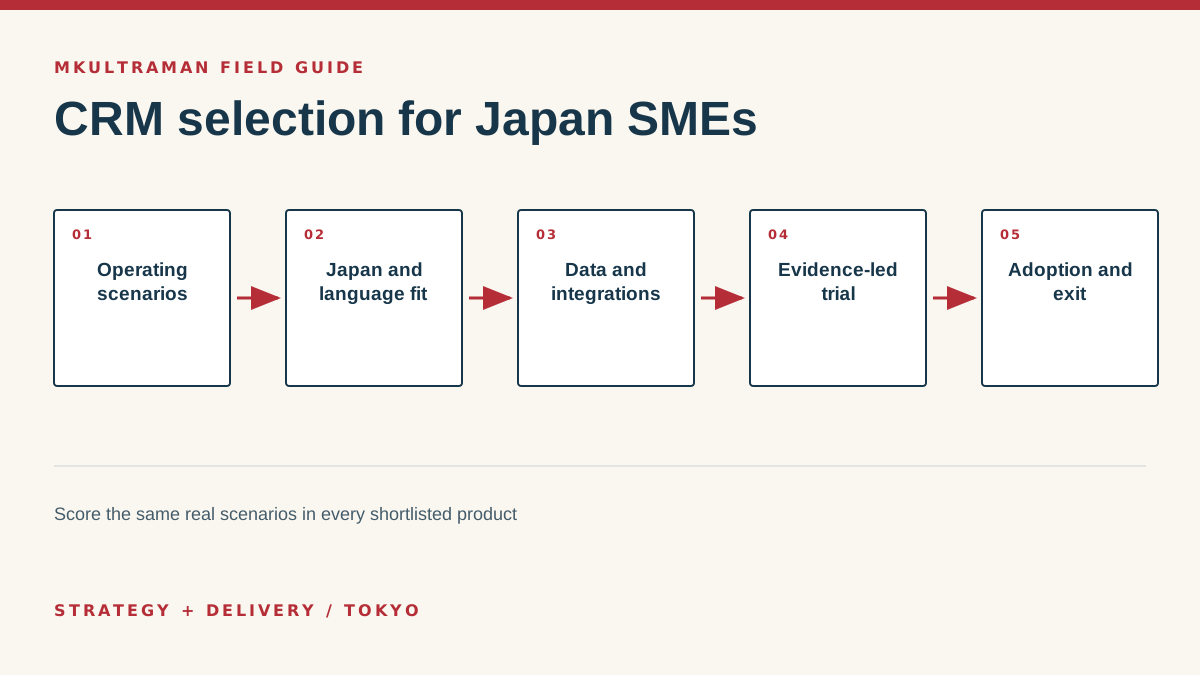
Write requirements as operating scenarios
CRM selection often begins with product names and feature grids. That is backward. Start with the work the company needs to perform and the decisions that depend on reliable customer information. A distributor managing long business-to-business cycles, a professional network managing members and events, and a service firm responding to web inquiries may all call the system “CRM,” but the records, timing and handoffs are different.
Interview the people who sell, serve, invoice and manage. Ask them to walk through a recent relationship from first contact to current status. Note where information enters, which decisions are made, what is copied, who waits, and where the company loses context. Use actual examples rather than asking whether a feature sounds useful. People can describe a painful handoff more accurately than they can design a software specification in the abstract.
Convert the evidence into five to eight scenarios. Examples include qualifying a bilingual inbound lead, handing an opportunity from a founder to an account manager, renewing a customer, recording a channel partner, respecting a marketing opt-out, and producing a forecast management can explain. Define the successful outcome and the evidence that should remain. Use these same scenarios with every shortlisted product.
Separate needs from preferences
Mark each requirement as essential for launch, useful later or optional. Also mark who needs it and how often. A capability used by every salesperson daily deserves more weight than an executive chart viewed once per quarter. Challenge requirements inherited from an old platform. The aim is not to reproduce every historic field and approval, but to preserve what the business genuinely needs.
Include nonfunctional requirements: Japanese and English use, mobile access, administrator skill, availability, support, export, security, privacy, data location where relevant and integration reliability. Add budget as a total range covering implementation, licenses and continuing administration. That prevents a low entry price from hiding a system the company cannot maintain.
Check practical fit for Japan operations
Japanese-language interface support is one consideration, but operational fit goes further. Ask representative users to enter kanji, kana and Roman-character names; search each form; use Japanese organization and address conventions; export the results; and view them on a phone. Confirm how the system handles time zones, fiscal periods, currencies, consumption-tax fields and the reports the company actually uses.
Support arrangements matter. A global vendor may provide excellent documentation but no Japanese support in the chosen tier. A domestic partner may offer migration and training but control the account or configuration in a way that complicates exit. Establish the contracting entity, billing currency, support language, support hours, escalation route and ownership of the tenant before signing.
Evaluate communication channels honestly
Teams in Japan may begin customer conversations through email, forms, LINE, Facebook Messenger, WhatsApp, events or personal introductions. The CRM does not need to ingest every message. Decide which interactions create a business record and what concise outcome should be retained. Copying full private conversations can create noise and unnecessary personal data. Sometimes a dated note and next action are the better record.
Keep communication preference and consent explicit. Email correspondence about an active request is not automatically consent to a newsletter. A contact on a social platform may prefer a different channel for continuing business. See the Ultra Stack communication model for the distinction between bridge channels used to begin contact and preferred channels used for efficient, secure continuing work.
Map data authority and integrations
List the systems that hold customer-related information: website forms, email, spreadsheets, event ticketing, accounting, support, marketing and contracts. For each important field, name the authoritative system. The CRM may own relationship status and next action while accounting owns invoice payment. The website may capture an inquiry, but the CRM assigns the permanent customer ID. Written authority prevents integrations from overwriting better data with older copies.
| Data or event | Possible authority | Integration question |
|---|---|---|
| Person and organization | CRM | How are duplicates and updates resolved? |
| Web inquiry | Website, then CRM | What validates input and records source? |
| Invoice status | Accounting | Does CRM need detail or only a status? |
| Newsletter consent | Publishing platform or consent register | How are unsubscribes protected from overwrite? |
| Support outcome | Help desk | Which summary belongs in the relationship view? |
Review authentication and permissions for each connection. Prefer supported APIs and vendor-maintained integrations where they meet the need, but still assign an owner and monitor failures. A no-code automation can be perfectly suitable, yet it remains production infrastructure. Record its trigger, credentials, transformation, retry behavior and alert recipient.
Avoid automatic email logging until privacy and relevance have been considered. If it is enabled, give users clear rules and ways to exclude sensitive conversations. Limit who can export the full database. Use individual administrator accounts and multifactor authentication. Review Japan’s personal-information rules and cross-border guidance against the actual data and vendors involved.
Run an evidence-led trial
Give each shortlisted system the same clean sample data and scenarios. Have real users perform the work while an evaluator records time, confusion, missing capabilities and workarounds. Do not let one product benefit from a polished vendor setup while another is judged from an empty default account. Configure only enough to test the essential model.
Test administration too. Add and remove a user, change a role, inspect an audit record, recover access, export data and disconnect an integration. Ask support one realistic question and observe the answer. Review contract length, price escalation, storage or activity limits, backup and deletion terms. Request security and privacy materials appropriate to the consequence of the data.
Score risk and total ownership
Use weighted criteria tied to the requirements. Daily workflow and data integrity usually deserve more weight than visual preference. Include implementation effort, internal administration, integration maintenance, training and exit. Record important assumptions. If a product scores well only because the team assumes a future integration will solve a gap, verify that integration before selection.
Run a reference call when the system is consequential. Speak to an organization with a similar operating pattern, not merely similar headcount. Ask what required unexpected customization, what users resisted, what support is like after purchase and how cleanly data can be exported. A reference is evidence, not a guarantee, but it can reveal costs absent from a demonstration.
Plan adoption, ownership and eventual exit
Implement the smallest complete workflow. Name the business owner, technical administrator and executive sponsor. Publish stage definitions, field purpose, permission rules and response expectations. Migrate approved data in rehearsed batches and keep rollback possible until validation passes. Train by scenario, then support people during live work.
Management behavior is decisive. Use the CRM in pipeline, service or membership reviews rather than requesting a shadow spreadsheet. When the record is wrong, correct the process and explain the definition. Remove unused fields. Investigate opportunities with no next action. Reward accurate closure, including lost opportunities, instead of encouraging permanently optimistic pipelines.
Review after 30, 90 and 180 days. Measure record completeness only where it matters. Also measure duplicate work, follow-up reliability, forecast explainability, handoff delays and user-reported friction. Maintain a configuration log and integration register. Export core data and attachments on a schedule, and open the files.
A successful CRM is not the one the company can never leave. It is the one that improves customer work while preserving ownership of the relationships and evidence. If the team can explain its model, recover access, reproduce key reports and migrate readable records, the software remains a useful tool rather than a trap.
Tips and practical checks
Small moves that prevent expensive cleanup
- Score products with the same five real scenarios, including one awkward exception, instead of accepting separate vendor demonstrations.
- Ask a Japanese-speaking user to test search, input, address fields, name order, mobile use and exported reports.
- Calculate total ownership with implementation, integrations, support, premium features and exit work included.
- Name a business process owner and a system administrator. One person may hold both roles, but the responsibilities are different.
- Require a plain export of core records and activities before signing a long contract.
- Treat dashboard disagreements as data-definition problems. Write the meaning and owner of every management metric.
Watch
What Is HubSpot CRM?
Video by HubSpot. Watch on YouTube ↗
FAQ
Frequently asked questions
Which CRM is best for a small company in Japan?
There is no universal winner. The best fit depends on process complexity, Japanese-language use, integration needs, internal administration capacity and budget. A controlled trial using the company’s own scenarios produces stronger evidence than a generic ranking.
Should the CRM be the master customer database?
Often, but not automatically. Define the authoritative system for identity, contracts, billing, support and marketing consent. Some data should remain in specialist systems with stable IDs connecting the records.
How long should CRM implementation take?
A narrow first release can take weeks, while a multi-team migration with integrations and historical cleanup can take months. Scope the first useful operating loop and delay low-value customization.
How do we improve adoption?
Remove duplicate entry, make the next action clear, involve users in testing, train by job scenario and have managers use the system in regular reviews. Adoption follows practical usefulness and consistent expectations.
Sources and further reading
Official references
Product features, prices, and Japanese requirements can change. Check the primary source before making a consequential decision.
- Personal information protection laws and guidance ↗ Personal Information Protection Commission, Japan
- HubSpot CRM ↗ HubSpot
- Salesforce small business solutions ↗ Salesforce
- Microsoft Dynamics 365 Sales ↗ Microsoft
- Zoho CRM ↗ Zoho